Your school, in one system.
Each teacher with their own schedule inside your URL. Consolidated finance in one place. Centralized students. Classes with recording and automatic post-class. All under the school's name, not as a catalog item in a marketplace.
live · 47:12Your school stitches five systems and twelve WhatsApp groups.
And every month someone forgets to close something. The more teachers you add, the more loose ends; an operation that doesn't scale turns into students leaving without you seeing it coming.
Hours spreadsheet runs the whole operation.
Who taught how many classes, who rescheduled, who cancelled, who missed. All on an Excel file that lives open on your machine and barely survives closing the month.
The student pays the school and lives on foreign tools.
Subscription comes to the school. But the class link is Google, the material is on Drive, the notice is on WhatsApp. Where does the school's brand show up for the student?
Class on Meet ends and nothing is left.
No recording, no transcript, no material on record. Parents ask what their kid learned and nobody has a way to show.
Each teacher operates their own way.
One sends a voice note, another sends a PDF, another sends nothing. The student switches groups and the experience changes overnight.
Every class you teach becomes visible material the student can open anytime.
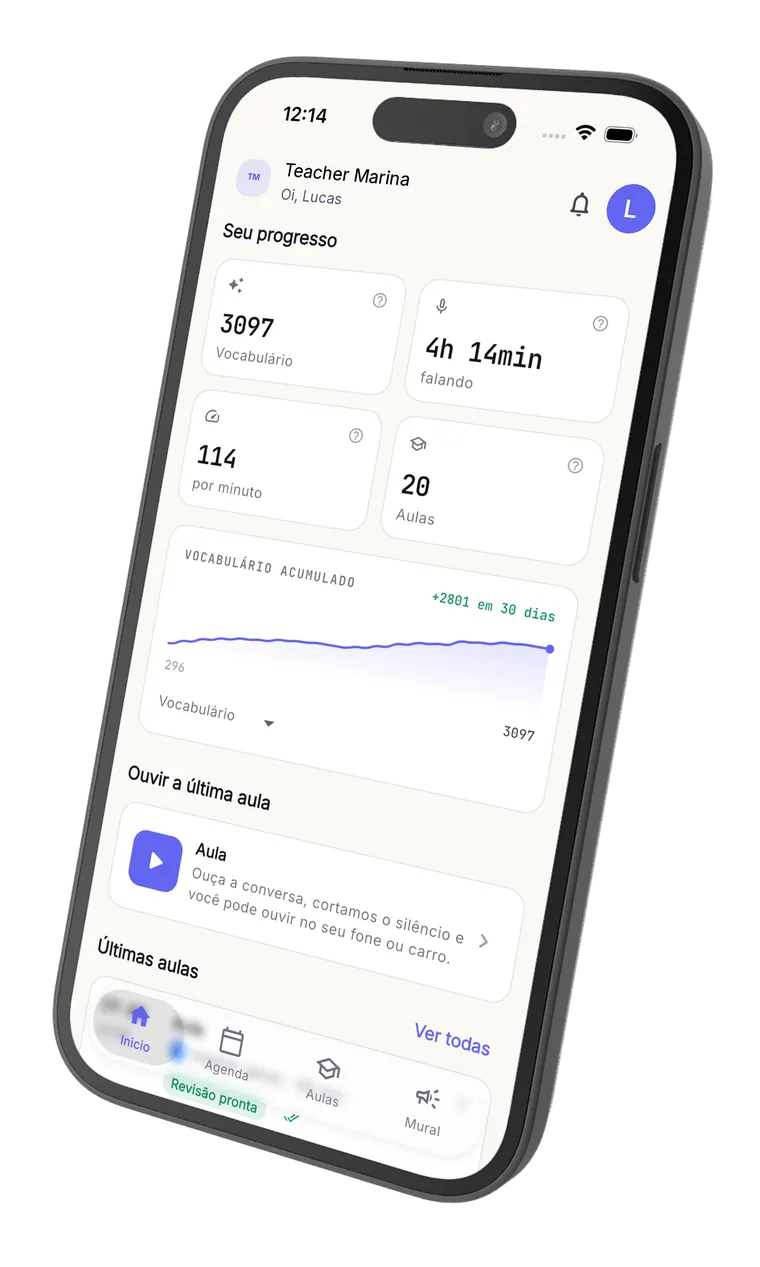
Noladi records, transcribes, identifies new vocabulary and shows the student's progress on a chart. Automatically, minutes after class. You teach. We document. The student renews.
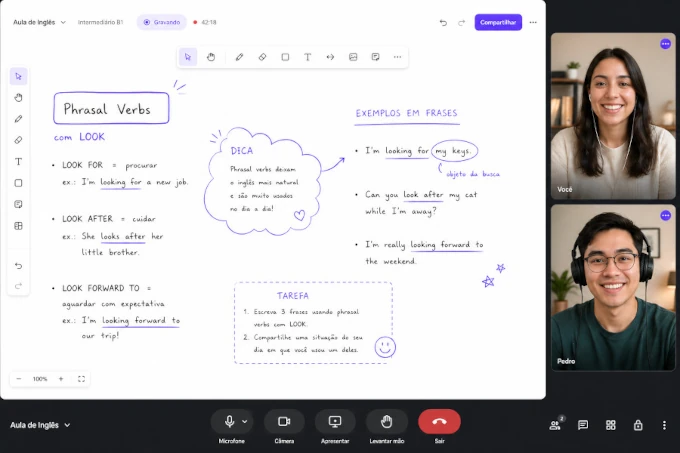
Live class inside your system.
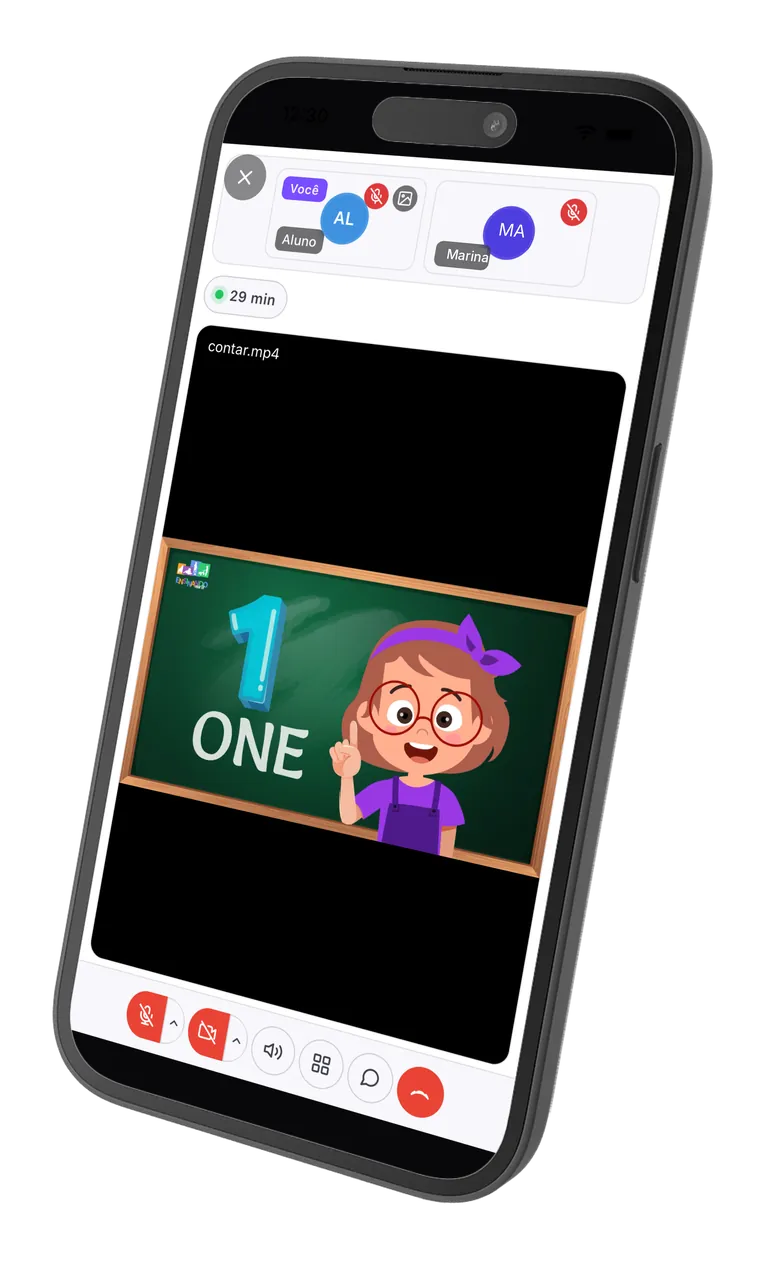
Video, collaborative whiteboard, screen sharing, chat. The student joins through your URL with one click, on phone, tablet or laptop. Nothing to install.
Automatic AI post-class.
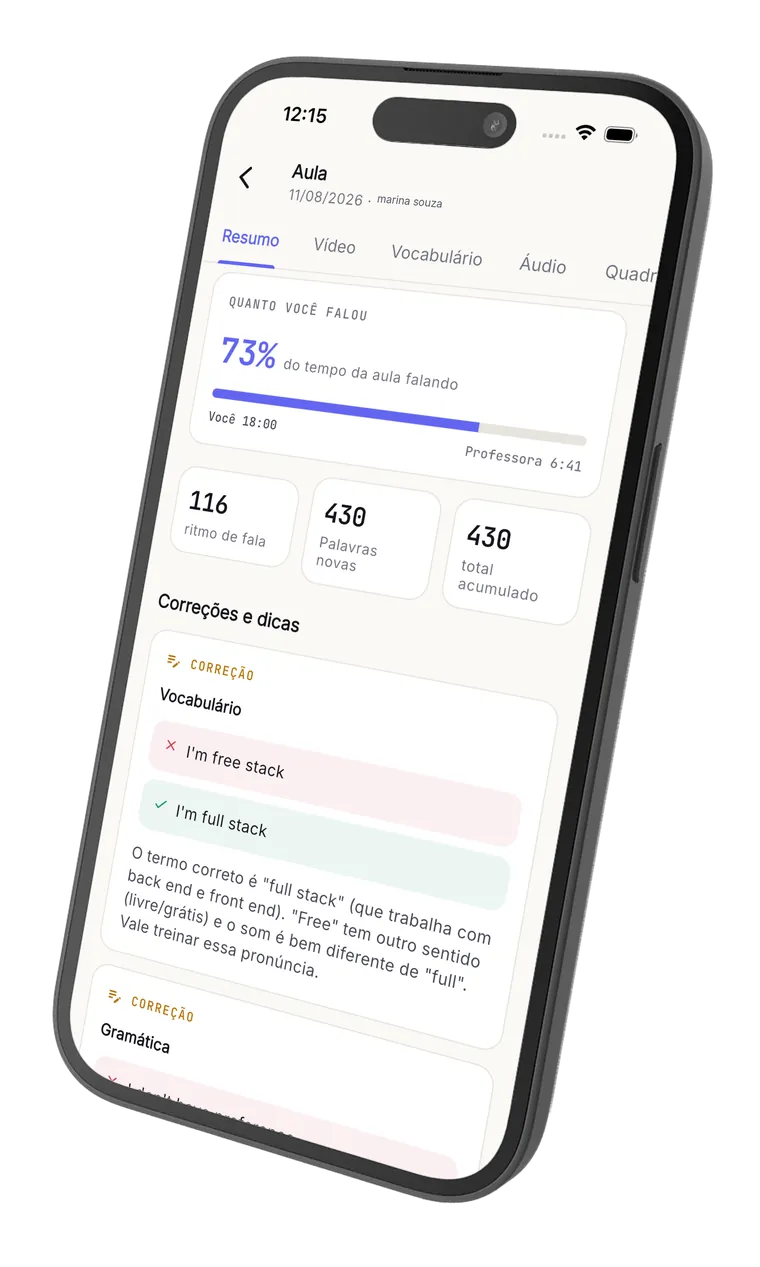
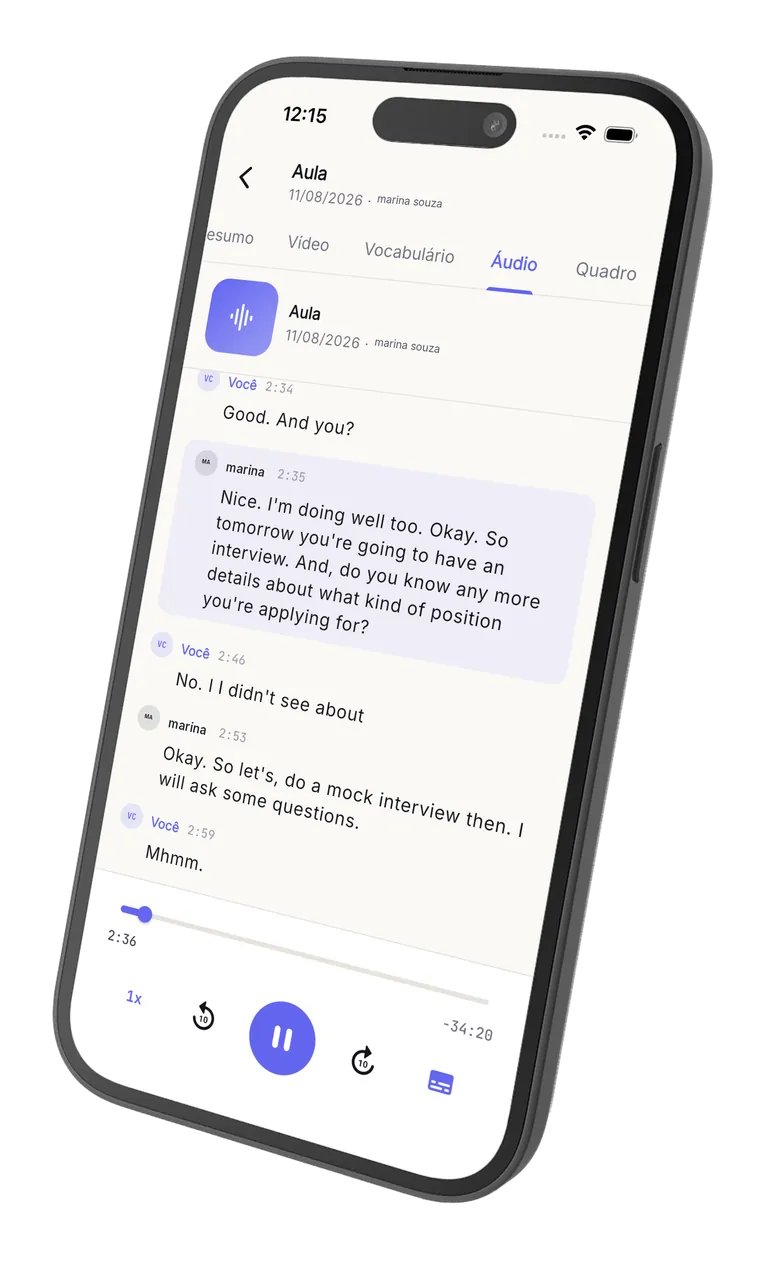
Minutes after class ends, the student has on their dashboard the recording, the speaker-by-speaker transcript, new vocabulary with grammar classification, speech metrics and AI corrections. You review nothing.
Everything with your brand, on your URL.
yourname.noladi.app with your logo, your colors, your domain. The student knows you, not us. You don't become a catalog item inside someone else's marketplace.
It's not videoconferencing. It's a classroom.
Collaborative whiteboard, Canva slides inside the class, imported PDFs, video and screen sharing. The student isn't watching passively: they draw with you, mark answers, write on top of the material you brought.
Real-time collaborative whiteboard.
You draw, write, build an exercise; the student writes with you on the same screen. No 'send me the board link', no separate app.
Canva slide straight in the room.
Import your Canva design's link and the slide becomes part of the whiteboard. No tab switching, no fuzzy screen share, no 'can you see this?' every minute.
PDF and material on the board.
Drag the class PDF onto the whiteboard and the student marks, draws and answers on top. The exercise happens inside the room, not somewhere else.
Video, screen share and chat.
The basics done right, on the browser, nothing to install. Works on the student's phone, tablet and laptop.
From invite to review. All inside Noladi.
A Noladi class starts when you invite the student and ends with them reviewing everything in your panel. In between, the live class happens right here: Noladi is your classroom, in place of Zoom or Meet.
- 01
Invite the student.
You add the student and send the invite. They land on your domain, with your brand, and start seeing classes and materials in a panel that looks like you, not like Noladi.
- 02
Schedule the class or start now.
Book a time or hit start now. The student gets the link and joins in the browser, nothing to install.
- 03
Teach live, right here. Instead of Zoom or Meet.
The live room is Noladi's: video, a collaborative whiteboard where you draw and the student writes along, Canva slides and PDFs dropped onto the board, screen sharing and chat. This is what replaces Meet and Zoom.
- 04
The class becomes material on its own.
When you end it, Noladi handles the rest: the class is recorded, transcribed speaker-by-speaker, with new vocabulary classified and speaking metrics. No button, no upload.
- 05
The student reviews it all in your panel.
Minutes later they get an email and open the review on your domain: rewatch the class, read the transcript, hear the pronunciation and see their progress. With your brand, start to finish.
AI post-class.
Right after class ends, the student opens their space and finds: the recorded video with synced subtitles, the full transcript identifying who said each turn, stats about their own speech and AI corrections with explanations. That's how they review the class.
English with Pedro
Wednesday, April 30, 7:00 PM (8 min)

Transcript
So today we're going to talk about your last weekend. What did you do?
I goed to the beach with my family. The water was very cold.
Nice! Just a quick correction: it's "I went", not "I goed".
Ah claro, eu sempre esqueço esse.
I went to the beach. I want to go again next weekend.
Your English speech
Class topics
AI corrections
- GrammarI goed to the beach with my family.I went to the beach with my family.
The past of "to go" is irregular. "Goed" doesn't exist; the correct form is "went".
- VocabularyThe water was very cold.The water was freezing.
"Freezing" conveys very cold water better than "very cold". It sounds more natural to a native speaker.
Highlights
- A conversation is when two people talk and exchange ideas.
Clear, well-built definition — a complete and natural sentence.
- Fluency means speaking smoothly without too many pauses.
Great use of "smoothly" and "without too many pauses". Precise vocabulary.
Today you operate five systems. And nobody at the school remembers what's where.
Each teacher at the school operates differently, on different tools. The owner closes the month piecing fragments from five places together, and the student gets an experience that shifts from group to group.
And every month, the hours spreadsheet becomes the school's actual system.
yourschool.noladi.app. The student joins and sees the school's brand. Each teacher has their own schedule inside this single URL. You close the month looking at ONE screen.
One plan per class hour. Shared across teachers.
We don't charge per student, per teacher or commission on subscription. The unit is hours of class taught by any teacher at the school.
The cycle is the school's, not the teacher's. If one teacher does 80h in a month and another does 20h, that counts 100h toward the package. For larger or multi-unit operations, we tailor a plan for you.

I was the premium student. Then I built Noladi so independent teachers could deliver the same.
I'm Juarez, a developer for over a decade and a Cambly student for years. I'm not a language teacher, but I spent way too much time on the student side of the camera, studying English to be able to work on international projects.
What I saw on Cambly was an absurd experience standard: clean room, recording, progress dashboard, saved vocabulary. What I saw with most independent teachers I knew at the same time was the opposite: loose Zoom, WhatsApp voice notes, no records at all.
The problem was never the teacher. It was the infrastructure. A serious student pays for serious classes, but they only see the reason to pay more when the experience shows it. I built Noladi exactly to close that gap, without standing between the teacher and the student like a marketplace does.
1 complimentary live class.
You create the school's account, add a teacher (or yourself as a test) and teach a full class inside Noladi. Live room, recording, AI post-class. All of it. No card.
If after that class you decide Meet + Excel still works better for you, you don't have to do anything. Management stays free forever, even without a subscription.
Before migrating.
No. You add every teacher in the school without paying extra. The price is per hour of class taught inside the system, summing the whole team. If one of your teachers does 80h in a month and another does 20h, the package counts 100h.
Yes. Each teacher has their own schedule and only sees their group. You, as the school owner, see everything: total revenue, MRR, late subscriptions, hours per teacher. Consolidated finance on a single screen.
You import a CSV with your current student list (we provide the template) and add the teachers one by one. From there, new classes, subscriptions and student records happen inside Noladi; you stop using Notion, Meet and Excel for those functions as you get comfortable. You can run Noladi in parallel for the first 30 days, no need to migrate everything at once.
We tailor a plan when you pass the standard packages. For larger operations there's a scale discount and extra tooling (consolidated reports per unit, finance reconciliation, integrations).

Get 100 hours
Leave your contact and we'll show you how to get 100 hours to use on Noladi.
Your school deserves
one system.
Add the teachers, import the students, set up the school's brand. When you want to turn on the room, pick a package. Migrate from Notion + Meet + Excel in a weekend.