
Aprende con un profesor de verdad y llévate la clase entera contigo.
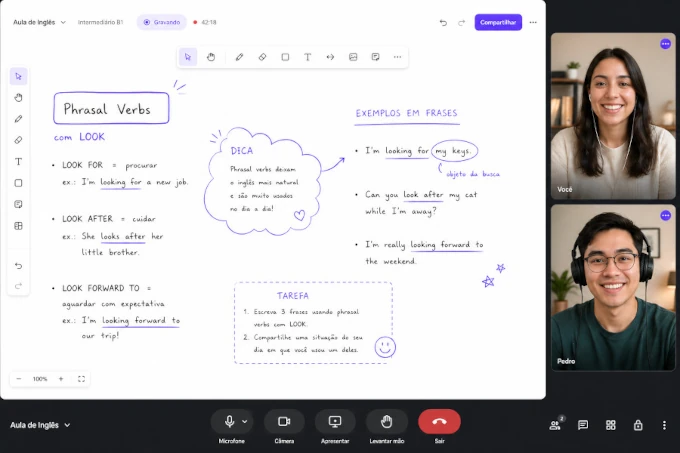
Cuéntanos qué quieres aprender y te presentamos a un profesor de nuestra red. Cada clase es en vivo, con pizarra colaborativa, y vuelve a ti en grabación, transcripción, correcciones y métricas de tu progreso.
 en vivo · 47:12
Cuéntanos qué quieres aprender
Cada registro lo revisa una persona, no un algoritmo. Con lo que completes aquí buscamos en nuestra red al profesor que encaje con tu objetivo, tu nivel y tu horario.
- 01Completas el formulario de abajo. Toma un minuto.
- 02Revisamos tu perfil y seleccionamos un profesor que encaje con él.
- 03Acuerdan la primera clase directamente, y de ahí en adelante es con el profesor.
Cuatro cosas que la clase en Meet o Zoom no te da.
No importa quién sea tu profesor. Si usa Noladi, después de cada clase abres el panel y encuentras todo esto, sin que él tenga que mandarte nada por WhatsApp.
Grabación completa, con subtítulos.
La clase entera grabada, lista para repasar. Vuelves a ese minuto donde te trabaste y relees exactamente lo que se dijo. Sin ver 50 minutos de nuevo.
Transcripción hablante por hablante.
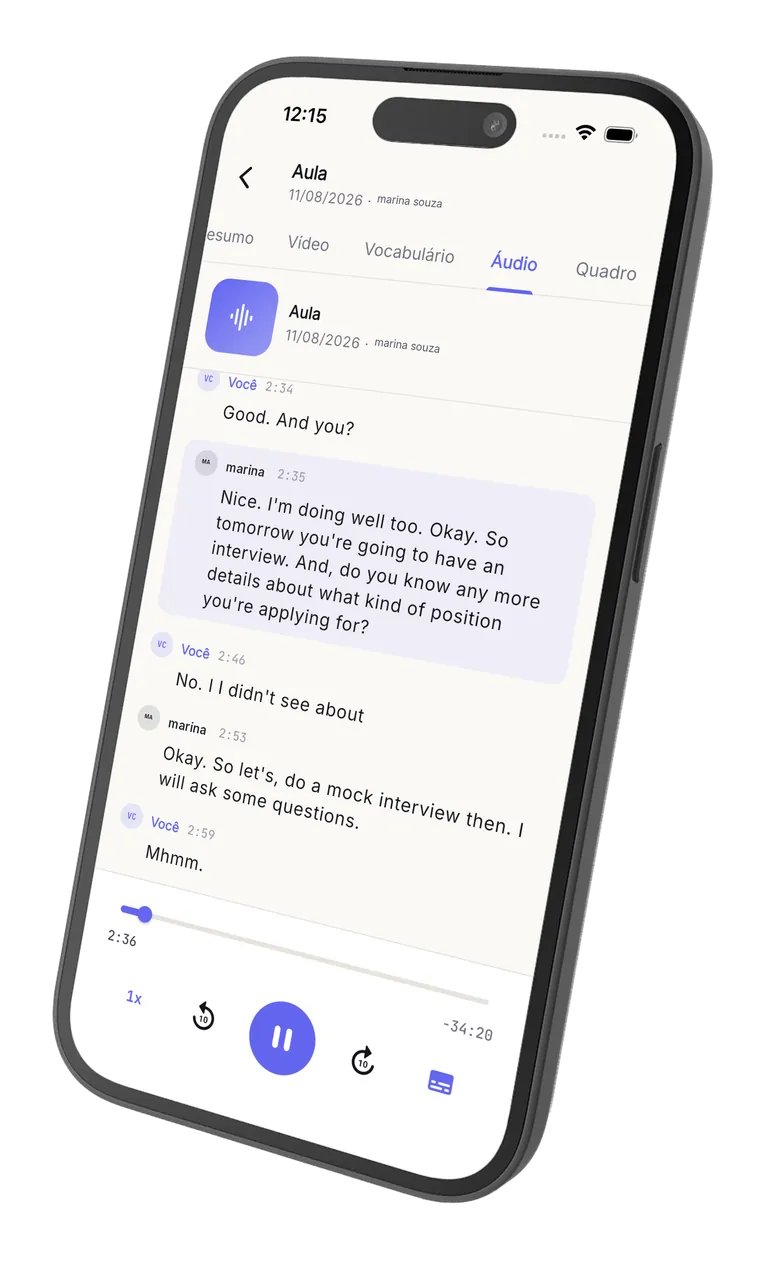
Cada línea marcada con su tiempo, separada por quién dijo qué. Haces clic en un turno y el video salta directo ahí.
Vocabulario nuevo, clasificado.
La IA marca las palabras que usaste por primera vez, con clase gramatical y ejemplo en contexto. Vocabulario acumulado desde tu primera clase.
Métricas de habla, clase tras clase.
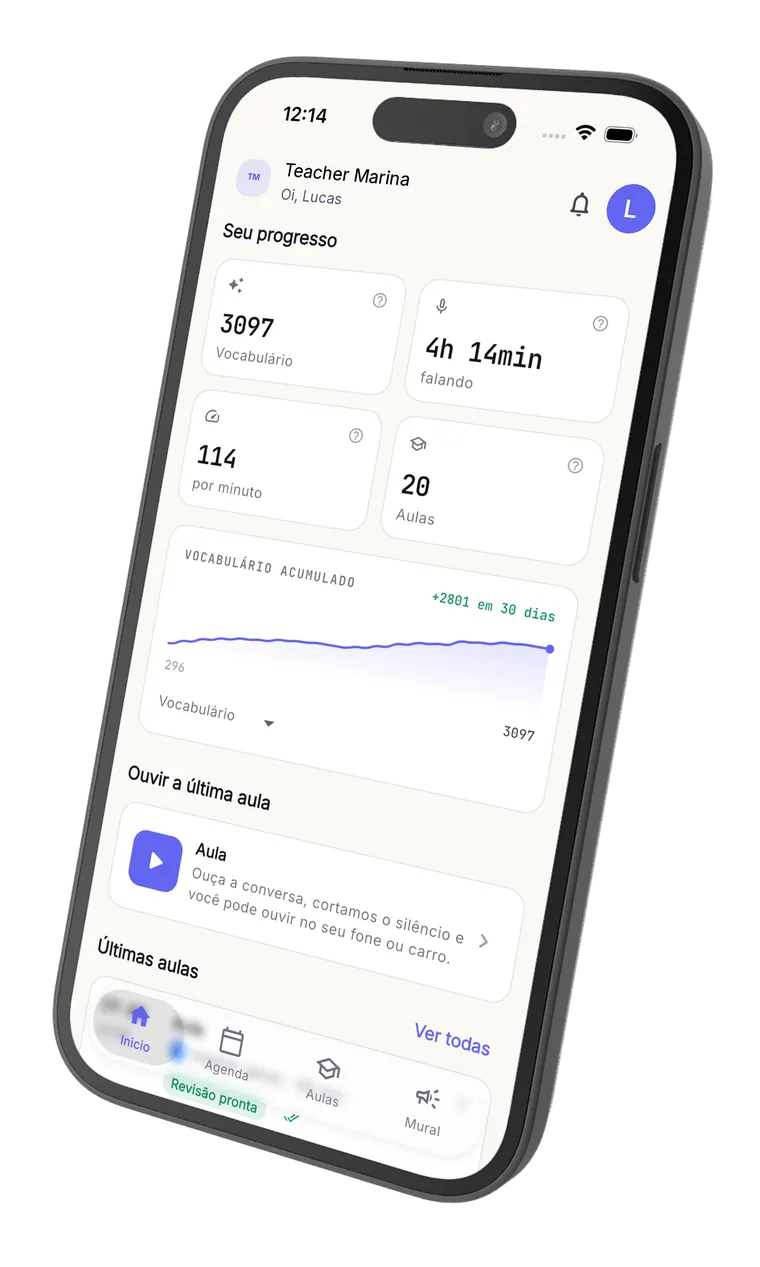
Cuánto tiempo hablaste, palabras por minuto, progreso desde el inicio. Ves la evolución de verdad, no solo una sensación.
No te quedas mirando. Escriben juntos.
La pizarra colaborativa te deja dibujar, escribir y marcar respuestas en la misma pantalla que el profesor. Diapositiva de Canva, PDF, ejercicio: todo dentro del aula, sin cambiar de pestaña.
Escribes en la misma pizarra.
No es solo mirar. Respondes el ejercicio dibujando, marcas palabras, escribes la respuesta. En tiempo real.
Diapositivas de Canva y PDF dentro del aula.
El profesor importa el material y tú marcas encima. Sin 'abre este enlace', sin 'mándame el PDF', sin cambiar de pestaña.
Video, pantalla compartida y chat.
Lo básico bien hecho, desde el navegador, en el celular o la laptop. Abres el enlace de tu profesor y ya estás en clase.
Todo queda grabado.
Cuando la clase termina, se convierte en material para repasar cuando quieras, junto con la transcripción y el vocabulario nuevo.
No te quedas mirando. Escribes junto al profesor.
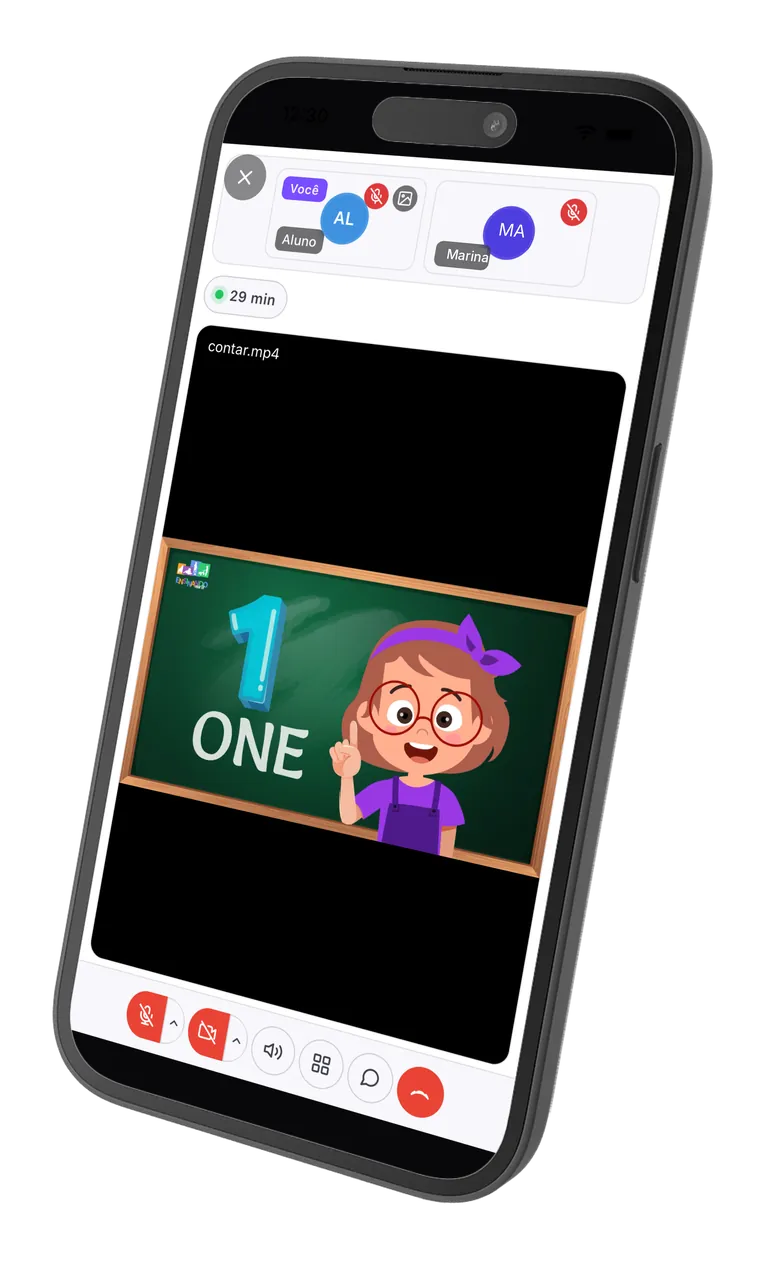
Esta es el aula donde pasa tu clase: el profesor escribe, tú escribes, y todo queda grabado para que lo repases después. Prueba la pizarra de abajo, es la misma de la clase.
Esta es la pizarra de verdad: puedes escribir, dibujar y borrar aquí mismo. No se guarda nada.
Cada clase se convierte en una pantalla de repaso completa.
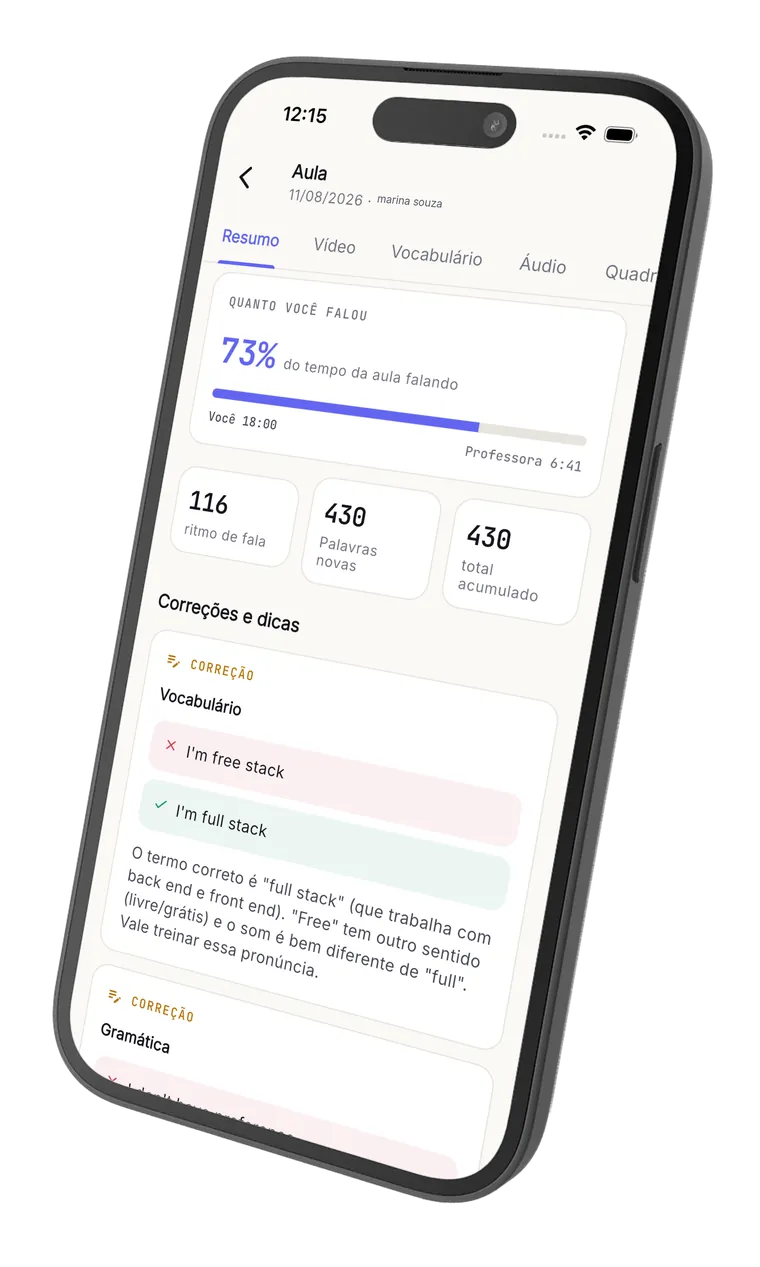
Justo después de que la clase termina, el alumno entra a su espacio y encuentra: el vídeo grabado con subtítulos sincronizados, la transcripción completa identificando quién habló en cada turno, las estadísticas de su propia habla y las correcciones de la IA con explicación. Así repasa la clase.
Inglés con Pedro
Miércoles, 30 de abril, 19:00 (8 min)
Transcripción
So today we're going to talk about your last weekend. What did you do?
I goed to the beach with my family. The water was very cold.
Nice! Just a quick correction: it's "I went", not "I goed".
Ah claro, eu sempre esqueço esse.
I went to the beach. I want to go again next weekend.
Tu habla en inglés
Temas de la clase
Correcciones de la IA
- GramáticaI goed to the beach with my family.I went to the beach with my family.
El pasado de "to go" es irregular. "Goed" no existe; lo correcto es "went".
- VocabularioThe water was very cold.The water was freezing.
"Freezing" transmite mejor la idea de agua muy fría que "very cold". Suena más natural para un hablante nativo.
Destacados
- A conversation is when two people talk and exchange ideas.
Definición clara y bien construida — una frase completa y natural.
- Fluency means speaking smoothly without too many pauses.
Gran uso de "smoothly" y "without too many pauses". Vocabulario preciso.
La clase sigue en el celular.
Descárgala gratis y llévate la sala en vivo, la revisión y el audio de la clase. Disponible para iPhone y Android.
Gratis para descargar. Profesor y alumno usan la misma app.
No lo decimos nosotros. Lo dice quien usa la plataforma a diario.

Una herramienta práctica y completa para profesores online. A mis alumnos y a mí nos gusta mucho la función de repaso, y el hecho de tener versión móvil facilita que mis alumnos accedan al contenido y a las grabaciones con más frecuencia.
De la clase en vivo al post-clase, sin montar nada.
Un recorrido rápido por las pantallas reales: la clase ocurre en la sala de Noladi y, cuando termina, el alumno recibe el video, la transcripción, las estadísticas y las correcciones de la IA.
No somos un marketplace. El profesor no es nuestro.
A diferencia de plataformas como Cambly, Preply e iTalki, no nos metemos entre tú y tu profesor. Quien te enseña es a quien elegiste, con su marca y su precio. Nosotros solo operamos la infraestructura.
No nos compras la clase a nosotros.
Le compras a tu profesor (o a su escuela). Directo. Mensualidad, paquete o clase suelta, es con él. No tocamos tu dinero ni cobramos comisión.
Si él se va, te vas con él.
No somos una plataforma donde la red es nuestra. El alumno es del profesor; él se lleva el historial si decide migrar. Sin candado, sin preferencias, sin algoritmo.
Desde el navegador. En cualquier dispositivo.
Sin app que descargar, sin 'instala el cliente', sin 'tu versión es vieja'. Abres el enlace de tu profesor en el celular o la laptop y ya estás en clase.
Antes de que empieces.
No. Quien contrata Noladi es el profesor (o la escuela). Tú solo recibes la parte buena: grabación, transcripción, vocabulario y progreso después de cada clase, desde el navegador y con la marca de él.
Sí. Entras al aula y al panel desde el navegador del celular, la tablet o la laptop. Sin app que descargar. Si ya abres WhatsApp Web, abres Noladi.
La grabación queda privada en el panel: tú entras con tu acceso y tu profesor con el suyo. Nadie de afuera la ve. Como vas a usar la grabación para estudiar, tiene sentido que exista.
Haz clic en el botón 'Compartir con mi profesor' de arriba. Abre un correo ya escrito para que solo pongas el destinatario y lo envíes. O copia el enlace https://noladi.app/teacher y mándalo por WhatsApp.
Deja tu contacto
y te presentamos a un profesor.
Cuéntanos qué quieres aprender y encontramos al profesor indicado para ti. El contacto lo hace una persona, no un bot.
